使用单元格对象的Insert方法,可以插入单元格或区域。Insert方法的语法格式为:
code.python
单元格或区域对象.Insert(Shift, CopyOrigin)其中,
• Shift参数 - 定义插入单元格或区域的方向,值为xw.constants.InsertShiftDirection.xlShiftDown时为上下方向插入,原位置以下的数据依次往下移;值为xw.constants.InsertShiftDirection.xlShiftRight时为左右方向插入,原位置及其右边的数据依次往右边移。
• CopyOrigin参数 – 表示插入的单元格或区域的格式与周边哪个的相同。值为xw.constants.InsertFormatOrigin.xlFormatFromLeftOrAbove时与左侧或上边单元格或区域的相同,值为xw.constants.InsertFormatOrigin.xlFormatFromRightOrBelow时与右侧或下边单元格或区域的相同。
对于图2-10所示的工作表数据,设置A1单元格的背景色为绿色,在A2处和B4:C5处插入单元格和区域。
code.python
>>> sht.Range("A1").Interior.Color=RGB(0, 255, 0)
>>> sht.Range("A2").Insert(Shift=constants.xlShiftDown,CopyOrigin=constants.xlFormatFromLeftOrAbove)
>>> sht.Range("B4:C5").Insert()
插入后的效果如图2-11所示。可见,在A2处插入的单元格复制了A1单元格的格式。按照设置,插入单元格或区域后,原来位置及其以下数据依次向下移动。

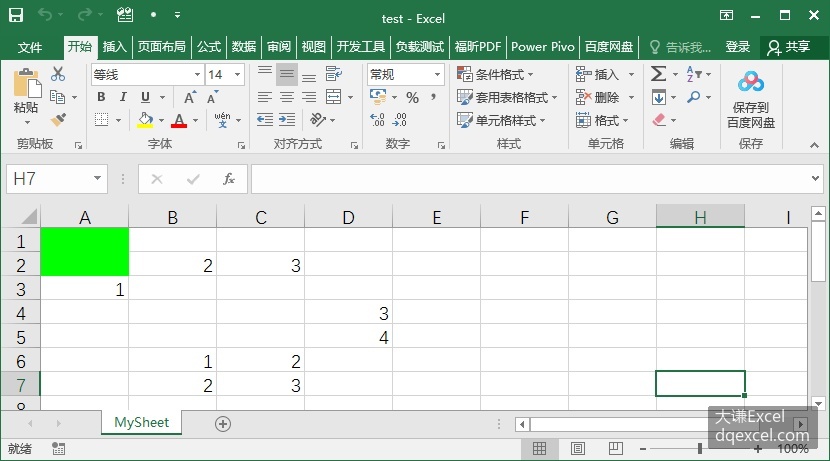
图2-10 原工作表数据 图2-11 插入单元格和区域后的工作表